

How modular “skills” are transforming AI coding agents in Cursor, Claude Code, Grok Build, Codex, and OpenCode
If you’ve spent any time with modern AI coding tools, you’ve probably felt the struggle I have to get consistency and quality from the agent. The more you try to make the AI agent(s) “remember” your team’s conventions, preferred patterns, security rules, or testing philosophy, the more your context window fills up with repetitive instructions. Eventually the model starts forgetting earlier parts of the conversation or producing inconsistent output.
Enter skills (a modular, reusable way to package expertise so the AI only loads the full details when it actually needs them). Think of it as giving your coding agent a Swiss Army knife instead of a single, ever-growing sticky note of instructions.
This may feel like a minor UX improvement for the AI coder or content creator. However, skills are a fundamental change in how these agents manage context, and it has specific (if sometimes subtle) effects on memory, CPU, and how you work day-to-day. Here’s what you need to know.
What Exactly Is a “Skill”?
A skill is a small, self-contained folder that contains a standard set of elements, which include:
- A required SKILL.md file with YAML frontmatter (name + description) plus the actual instructions, examples, and guidelines.
- Optional supporting files: helper scripts, templates, reference docs, or small executables.
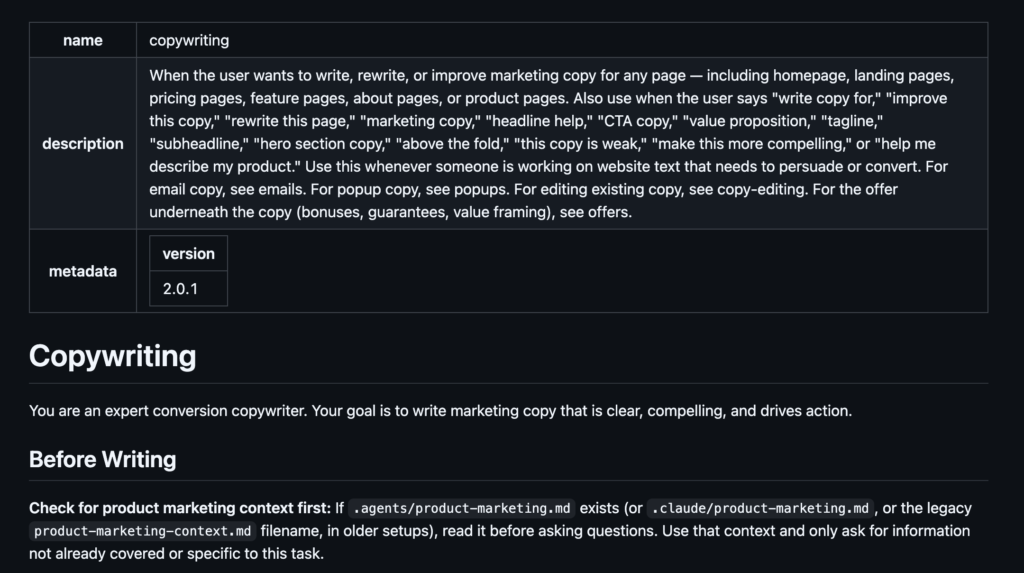
The cool innovation is how skills use progressive disclosure (also called lazy loading). When the agent starts a session, it only reads the short name and description from every available skill (usually just a few dozen tokens total). The full content of a skill is only loaded into context if the task at hand matches that skill’s description or if you explicitly invoke it (e.g., /code-review or /our-tdd-process).
This is dramatically more efficient than the old approach of stuffing everything into one giant CLAUDE.md, AGENTS.md, or rules file that sits in context for every single interaction.
Note, that while the origin of agent skills is likely attributed to Anthropic, the industry has leaned in and every competitive harness and foundation model shop is putting skills to use.
The Current Landscape (Mid-2026)
Here’s how the major coding harnesses handle skills:
| Tool | Primary Mechanism | Skills Support | Rules / Instructions File | Notes |
|---|---|---|---|---|
| Cursor | Rules + Agent mode | Partial / emerging | .cursorrules (project) or User Rules | Strong agentic Composer; less emphasis on modular skills than the others |
| Claude Code | Full Skills system | Excellent (pioneer) | CLAUDE.md or project rules | Rich frontmatter, subagents, hooks, permissions model |
| Grok Build | Full Skills + AGENTS.md | Excellent | AGENTS.md + skills | xAI’s terminal-native agent; walks repo for .grok/skills/ |
| Codex | Full Skills system | Excellent | Project docs + skills | OpenAI CLI/app; progressive disclosure, slash commands |
| OpenCode | Full Skills system | Excellent (very flexible) | AGENTS.md (with Claude fallbacks) | Open source; supports multiple locations + Claude compatibility |
Setup Locations: Where Do Skills Actually Live?
This is one of the most practical differences between the tools.
Claude Code
No introduction needed, I’m sure, but available here https://claude.com/product/claude-code
- Global/personal –
~/.claude/skills//SKILL.md - Project-specific (git-shareable) –
projectfolder/.claude/skills//SKILL.md - Also loads from enabled plugins
Grok Build (xAI)
A nifty CLI-based platform (so far), available at https://grok.com/build
- Project:
./.grok/skills//SKILL.md(walks up to repo root) - Global:
~/.grok/skills//SKILL.md - Also from enabled plugins and extra paths in
~/.grok/config.toml
Codex (OpenAI)
Got ChatGPT? You may already have Codex! Codex is available as a standalone license (usage-based) or with your ChatGPT Pro and up subscriptions. Available at https://openai.com/codex
- Common locations:
~/.codex/skills/or~/.agents/skills/ - Project-level skills also supported
OpenCode (open source)
This is a super cool project. Available at https://opencode.ai/
- Highly flexible (it checks multiple conventions):
.opencode/skills/.agents/skills/.claude/skills/(for Claude compatibility)
- Global equivalents in
~/.config/opencode/skills/,~/.agents/skills/, etc. - Walks up the directory tree from your current working directory
Cursor
Available at https://cursor.sh and recently acquired by xAI.
- Currently leans more on
.cursorrulesat the project root or User Rules in settings. - Some users manually place skills folders for use in agent mode, but it doesn’t have the same native discovery system yet.
Pro tip: Many people are converging on ~/.agents/skills/ as a de-facto shared global location that multiple tools can read.
How Each Harness Actually Uses Skills
Just about every harness and development IDE or web-based chat project tools follow the same core pattern:
- Discovery – At startup (or on demand), the harness scans the skill directories and reads only the YAML frontmatter (name + description).
- Selection – Either the model decides a skill is relevant based on the description, or you explicitly call it.
- Loading – Only then is the full SKILL.md (and any referenced files) pulled into context.
- Execution – The skill’s instructions run. If it includes scripts or ! shell commands, those execute on your machine (subject to permissions/trust settings).
Claude Code has the most sophisticated frontmatter options (including when_to_use, allowed-tools, context: fork for subagents, and hooks). Grok Build and Codex are very close behind. OpenCode is deliberately compatible with the Claude format while adding its own flexibility.
The Real-World Resource Impact when Using AI Skills
Different layers of the AI stack are affected by how skills affect the flow and process with your IDE (or website) of choice. At the lowest layer, we have clear wins and more efficiency being developed as compression and KV caching come into play.
Context Window (the biggest win)
This is where skills shine. A well-organized skill set can keep your baseline context lean even when you have 15–20 specialized capabilities available. You’re no longer paying the token tax for every rule on every turn. Invoked skills are retained intelligently (Claude, for example, has budgets for how many invoked skills stay in compacted context). The result should be longer, more coherent agent sessions and lower overall token usage. Yes, please!!
Memory & CPU Impact
- The agent process itself has minimal overhead from skills.
- The real resource hit comes when a skill actually does something (running linters, tests, custom Python analyzers, builds, or git operations). These run locally and can spike CPU and RAM exactly like any other dev tool would.
- If you’re using OpenCode with a local model (Ollama, etc.), then GPU/CPU/RAM usage for inference becomes relevant too.
GPU Impact
- Almost irrelevant for the skills layer itself. The heavy GPU lifting happens on the model provider’s side (Anthropic, xAI, OpenAI) or on your local machine only if you’re running local inference in OpenCode.
With these impacts in mind, what about the advantages and disadvantages when using skills in your development or creative workflow?
Advantages of Using Skills
- Dramatically better context efficiency (the #1 reason most power users adopt them).
- Reusability and sharing – drop a skill folder into git or share it as a single directory. Community skill repositories are already appearing.
- Consistency at scale – encode team standards, architecture decisions, or security requirements once.
- Specialization without bloat – you can have deep expertise for frontend performance, database migrations, security reviews, or your specific monorepo layout without polluting every prompt.
- Extensibility – skills can include real scripts and tooling, not just instructions.
Disadvantages and Gotchas
Everything is a set of trade-offs, so treat each capability and the associated effort accordingly. This is a moving target with so much innovation happening in the space. I imagine we will be evolving how context management and skill usage is morphed to gain efficiencies and consistent quality.
- Setup cost – writing good descriptions and tight instructions takes thought (though community skills reduce this).
- Portability friction – a skill that triggers perfectly in Claude Code might need tweaks to descriptions or frontmatter to behave the same in Grok Build or Codex. The matching logic isn’t identical everywhere.
- Permission & security model – executable parts of skills need proper trust settings. Don’t blindly install random skill folders.
- Maintenance: as your stack or conventions evolve, skills need updating just like any other documentation.
- Over-fragmentation risk – too many overlapping or poorly described skills can confuse the model’s selection process.
- Cursor is still more rules-oriented – if you live primarily in Cursor, you’ll get some of the benefit from good .cursorrules but less of the modular lazy-loading magic today.
In general, you can’t be too “wrong” with using skills. It’s better than raw prompts and few-shotting with hope as your guide.
Are AI Skills Really Required?
If you’re doing anything beyond trivial scripting or one-off tasks, yes (especially if you work in large codebases, on teams, or switch between multiple AI coding tools.
It’s very easy to start small, pick your highest-pain, highest-value workflows and turn them into 2–4 skills:
- Strict TDD / test-first process for your stack
- Security review checklist tailored to your language/framework
- Your team’s specific architecture and naming conventions
- Performance or accessibility audit guidelines
Many of these already exist in community repos (you can adopt and adapt rather than writing everything from scratch).
The difference between a merely helpful AI coding assistant and one that feels like a genuine force multiplier increasingly comes down to how well you equip it with the right modular capabilities (and how efficiently it can access them without drowning in its own context window).
Skills are still maturing, but they’re already one of the highest-leverage things you can add to your workflow in 2026. The teams and individuals who treat skills as first-class artifacts (versioned, reviewed, shared) are pulling ahead fast.